Free Digital Downloads

Digital Scrapbooking Day Online Event

Wow I can’t believe Stampin’ Up! is giving away free Digital Downloads.  Be sure to check this out.

Dates: November 4-7, 2011

Details: Celebrate Digital Scrapbooking Day with Stampin’ Up! for a four-day online event. Digital Scrapbooking Day is November 5, but we’ll keep the celebration going from November 4-7! The event will include free downloads, blog posts with exciting project ideas all weekend long, and the announcement of the 2011 My Digital Studio Contest winners.

Get the FREE Downloads:

You can access the free downloads from MyDigitalStudio.net November 4-7, after completing a quick survey.

Brand-new, never seen before FREE downloads include:

  • So Typefelt Stamp Brush Set
  • Neutral Delightful Digital Tape
  • Home for the Holidays Ensemble
  • Delight in the Day Photobook Template

View downloads, here.

Be sure to check out this great product.  I love my digital studio.  It’s so easy to use and fun to create great projects for my family and friends.  If you would like to see the product in person just let me know.  I’d be happy to let you come over and check mine out.


Baby Jessica is Here!

Sorry I’m a bit behind on posting, but I have a great excuse.  I have to share with you my new bundle of  joy.  Baby Jessica was born on September 6th.  I’m so excited to have her here.  I’m also ready to get back to Stampin’.  It’s been a rough 9 months, but she’s worth it.  Thanks so much to everyone for your support.  Be watching for new classes, projects and other fun events coming soon.

I created this fun page with MDS.  The best part was I could hold Jessica in my arms while I made it.  If you are interested in learning more just let me know.  It’s an awesome program and so easy to use.  I’m looking forward to creating more fun projects.

National Scrapbooking Month Promotion

Promotion Dates: May 1-31, 2010

Promotion Details: 

May is National Scrapbooking Month–the perfect time to get all those memories put in a book to share.

To assist you in this, we’re offering a special promotion for the month of May: purchase a qualifying scrapbooking stamp set or the My Digital Studio software and receive a FREE package of Designer brads–choose from four designs! 

Qualifying products and Designer brads are listed below:

Stamp sets

 Page Description Wood-Mount Item  Wood-Mount Price  Clear-Mount Item  Clear-Mount Price 
 81 Extreme Elements 115181  $26.95  —  — 
119  Framed with Love**  114389  $27.95  —  — 
128  Certified**  113706  $27.95  —  — 
129  Circle Circus  115778  $28.95  —  — 
12*  Elements of Style 118611  $27.95  120045  $19.95 
13*  Mementos  119910  $27.95  120105  $19.95 
13*  Elements de style  119900  $27.95  120099  $19.95 
14*  Rough Type  118659  $26.95  120072  $18.95 
22*  Sentimental Journey  118513  $23.95  120075  $17.95 
25*  First Day  118521  $23.95  120051  $17.95 
25*  Camino a la Escuela  120152  $23.95  120154  $17.95 

*From Summer Mini Catalog
**Last Chance stamp set!

My Digital Studio software

 Page Description  Item  Price 
32*  My Digital Studio  118108  $79.95 

*From Summer Mini Catalog

Designer brads

Page  Description  Item   Retail Price  Price with Qualifying Purchase
179 Flower Designer brads  112579 $5.95  FREE 
179  Filigree Designer brads   112577  $5.95  FREE 
179  Circle Designer brads  112571  $5.95  FREE 
179  Star Designer brads  112572  $5.95  FREE 

Contact me today to place your order or book your party.

Candice Anderson
435-245-5321 Home
435-232-2655 Cell
andersoncandice@hotmail.com

Shop on-line at www.candiceanderson.stampinup.net.

New Spring Mini Catalog Items for MDS

New Digital Downloads for My Digital Studio

April 6, 2010

Punch up your My Digital Studio projects with eleven new downloadable images from Stampin′ Up! You will love these new punch images and stamp brush sets, and they’ll make a perfect addition to your My Digital Studio library.

Use the search keyword DWNLDA in OEX to see these new images, and place your order today!  http://www.candiceanderson.stampinup.net.

Click here to see other Digital Downloads that are available.

Item Number Name Price
121061 Vintage Overlay Stamp Brush Set – Digital Download $5.95
121062 Vintage Vogue Stamp Brush Set – Digital Download $3.95
121064 Well Scripted Stamp Brush Set – Digital Download $3.95
121066 Rough Type Stamp Brush Set – Digital Download $9.95
122131 Extra Large Two-Step Bird punch – Digital Download $0.95
122132 Extra Large Fancy Flower punch – Digital Download $0.95
122133 Medium Jewelry Tag punch – Digital Download $0.95
122134 Pinking Hearts Border punch – Digital Download $0.95
122135 Pinking Hearts Corner punch – Digital Download $0.95
122136 Scallop Trim Border punch – Digital Download $0.95
122137 Scallop Trim Corner punch – Digital Download $0.95

New Digital Downloads

Have even more fun with these new downloads for my digital studio or other software programs.  Remember Digital Downloads are only available on individual customer orders.  Just go to my website at www.candiceanderson.stampinup.net to place your order and start using them today. 

Click here to see more Digital Downloads.

Item Number
Name      
Price
121063    Satin Ribbon – Digital Download $3.95
120171    Mini Project Boxes – Digital Download $1.95
120172    Springs Shades Designer Series paper – Digital Download $4.95

Item Number Name    Price
118869    Recipes by Design Digital Kit $9.95
 120884  Your Invited Invitation Digital Kit $3.95

Recipes By Design Digital Kit - Digital Download - by Stampin' Up! You're Invited Invitation Digital Kit - Digital Download - by Stampin' Up!

Item Number Name    Price
120168  Textured Card Stock $4.95
 119978  My Sweet Pea Kit $9.95

 Textured Card Stock - Digital Download - by Stampin' Up!My Sweet Pea Digital Kit - Digital Download - by Stampin' Up!

 
Item Number Name    Price
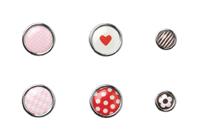
120170     Corduroy Buttons – Digital Download  $3.95
 120169     Sending Love Epoxy Brads – Digital Download  $1.95


Corduroy Buttons - Digital Download - by Stampin' Up!


My Digital Studio Software Update

February 25, 2010We have released an update to your My Digital Studio software; this update is version 1.0.2. If you have already updated to version 1.0.1, you will be informed of the new update the next time you launch your My Digital Studio software, or you can choose to Check for Updates under the Help menu to search for the 1.0.2 update.

However, if you have not yet updated to version 1.0.1 (announced December 3) then you should update to that version (follow the instructions here), after which your software will prompt you to restart. After restarting you can download the latest version (1.0.2) by choosing Check for Updates under the Help menu, as mentioned above. You must shut down your My Digital Studio software between downloading versions 1.0.1 and 1.0.2 and again after downloading version 1.0.2. Restarting the program enables the software to complete the update and allows for it to run as it should.

The version 1.0.2 update provides the addition of a Calendar Guide option under the View/Guides menu to show the bleed area for calendar creation. The bleed area shows the portion of the page that may be cut off or trimmed when your project is printed. The calendar guides show 1/2″ on the top and bottom of the page and 1/4″ on each side, no matter the calendar size or orientation.

The calendar bleed area will turn on by default when you open/use a calendar within My Digital Studio. You can also turn on your calendar guides by selecting Calendar Bleed Area under the View/Guides menu.

On the 10th day of Christmas . . .


The Stampin’ Santa gave to you a more Hybrid Cards from “My Digital Studio.”

So I still just love this product.  Here’s some fun easy Hybrid Cards that I made.  First I designed what I wanted on MDS then I printed it and added it to my project.

This is one of my favorites.  I love this quick and easy tag I made.  We even did this one as a make and take.  The “Don’t Open until Dec. 25 is from MDS then I punched it out.  The tag is one of the tags from the two tags die for the Big Shot.

.

.

.

.

.

This fun card also used the Big Shot.  I just layered 1″ squares on a white piece of cardstock.  Then I ran it through the Big Shot and cut it with the Top Note Die.  The “Merry and Bright was done with MDS then punched with the 1 3/4” circle punch.

.

.

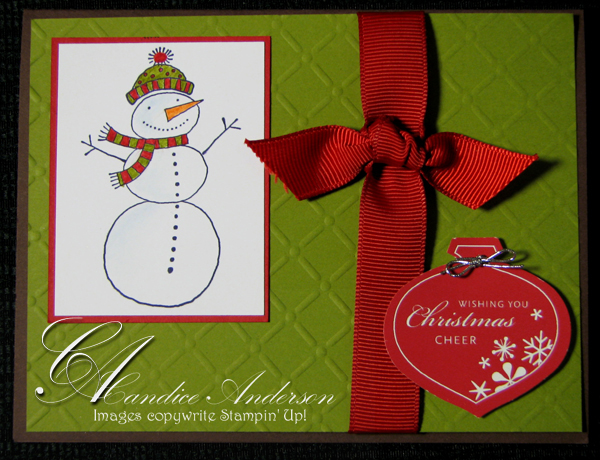
I really like this card.  The base of the card is Embossed using the Big Shot.  Then I stamped the cute snowman from the Hostess set in the Holiday Min.  The Ornament was created on MDS and then punched out with the ornament punch.

.

.

.

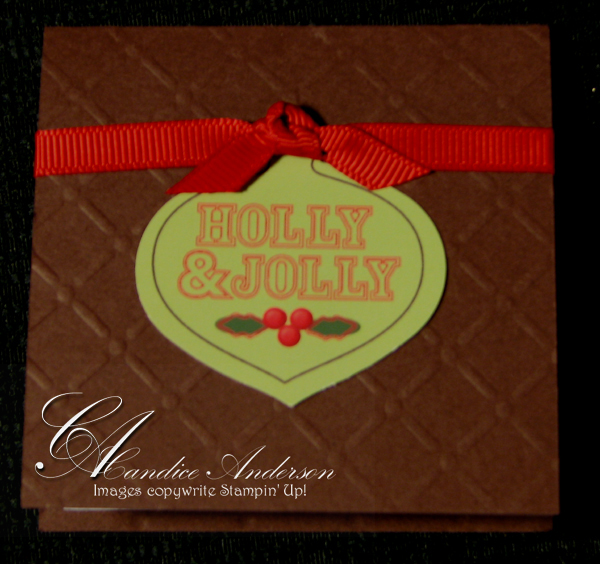
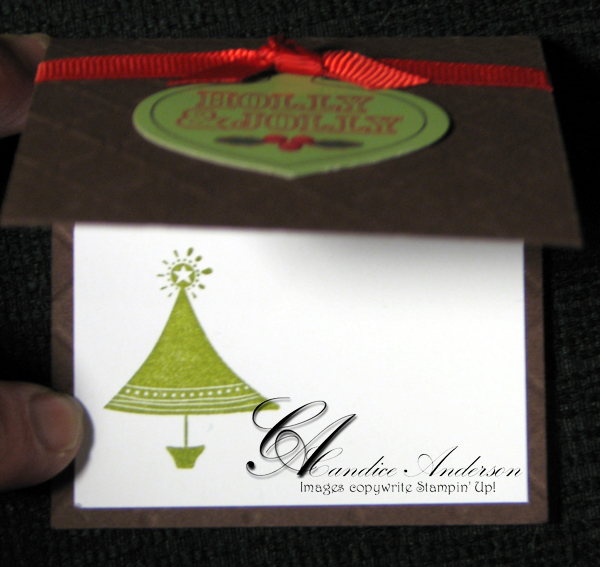
Here’s another quick and easy card.  It’s a fun 3 x 3 card once again embossed with the Big Shot.  The ornament on the front was created in MDS then punched out.  We also put a white paper inside to make it easy to write on and stamped a cute little tree on it.  So easy and simple.

Remember if you order MDS before December 26th you can get it for $15.00 off.  So if Santa didn’t get it for you treat yourself and get it from me.

To order call me at 435-245-5321 (Home) or 435-232-2655 (Cell & Messages.)  E-mail me at andersoncandice@hotmail.com.  Order on-line at www.candiceanderson.stampinup.net. Click on the shop now in the upper right hand corner.

Remember to check out my 12 Days of Christmas sale for all the great deals.  They end soon so call me today.